This post shows how to test what an AI agent does when an API it depends on is slow, rate-limited or down, with a bug-triage agent we tested this way as the worked example.
Why API failures are harder with agents
In ordinary code, a failed API call is handled by code, which defines some kind of deterministic logic - e.g., “if the call times out, retry twice, then show an error”. You can read that code to know what the program will do, and write a test that checks it.
This is not the case with agents. When a tool call fails, the model reads the error and decides what to do next: try again, skip the item, try something else, stop, or carry on and mention it in its report. The error text, the prompt and everything else in the conversation all influence that choice, but they don’t settle it: with the same inputs, the model can still choose differently from one run to the next. So there’s no code you can read to know what it will do. This makes API failures harder to test in three ways:
- The agent improvises, and can make risky choices. Nobody told it what to do about this particular failure, so it picks a response itself, most often a retry. That’s harmless when the call only reads data, but when the call writes something, a retry can create a second ticket, a second message or a second payment.
- The same failure can end differently. The model’s choice isn’t fixed, so the same failure at the same point can get a different response the next time. In one run the agent may wait, retry and finish the job, and in the next it may give up halfway. That means a single test that passes doesn’t tell you the failure is handled.
- The agent’s report can be wrong. When the work is done, the agent writes a summary of what it did, and that summary is often all anyone reads. But the agent only knows what its tool calls returned. If a call timed out, it can’t tell whether the request went through, so it may say a ticket wasn’t created when it was, or say there are no duplicates when there are two.
Real API failures are also rare and come at random, so you may never see one during development. To test how the agent handles them, you have to cause the failures yourself. Doing that before you ship shows where the agent or its tools need fixing, and where to look first when something goes wrong in production.
How to test an agent against API failures: a step-by-step example (that your agent can also implement)
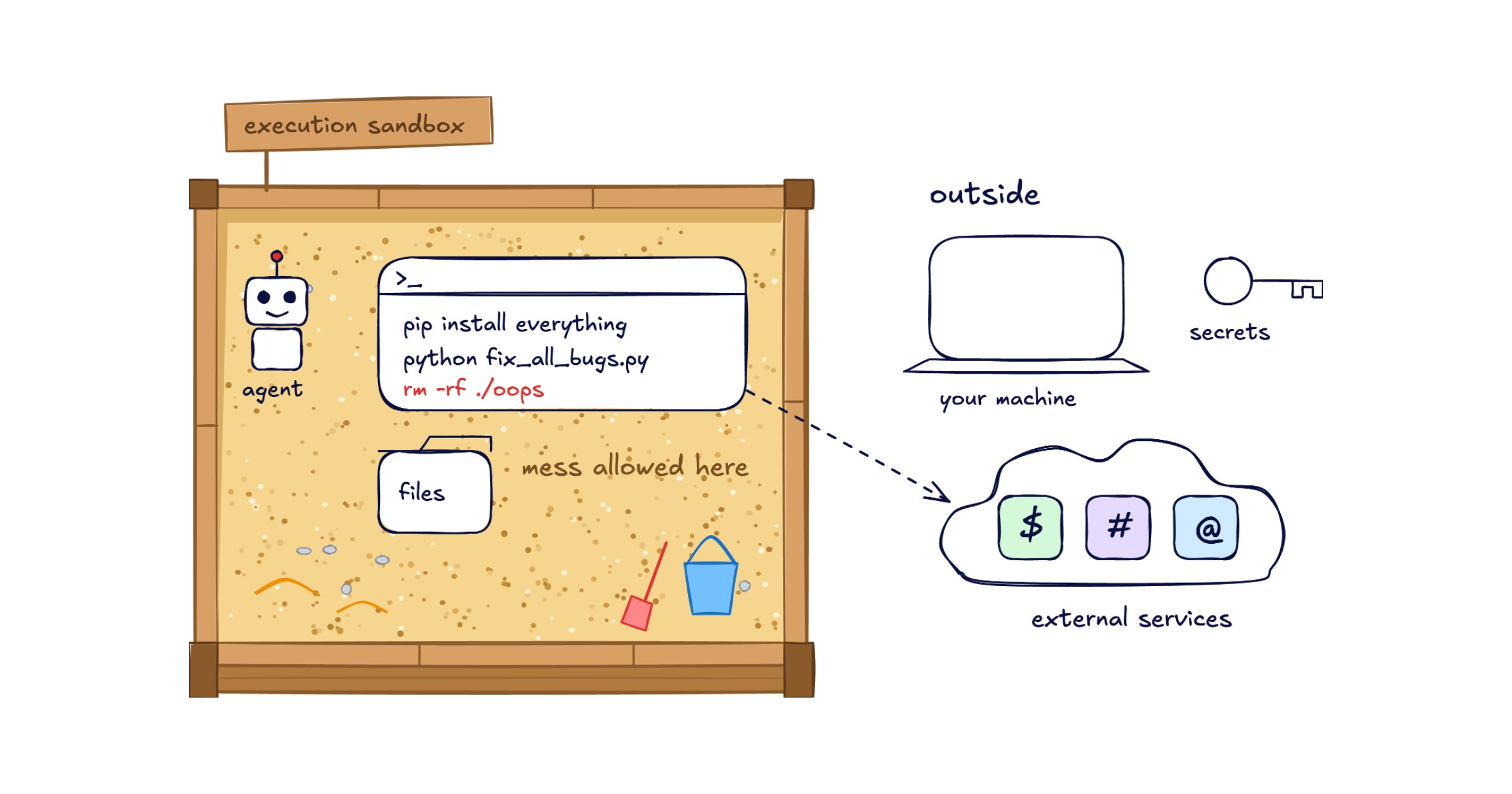
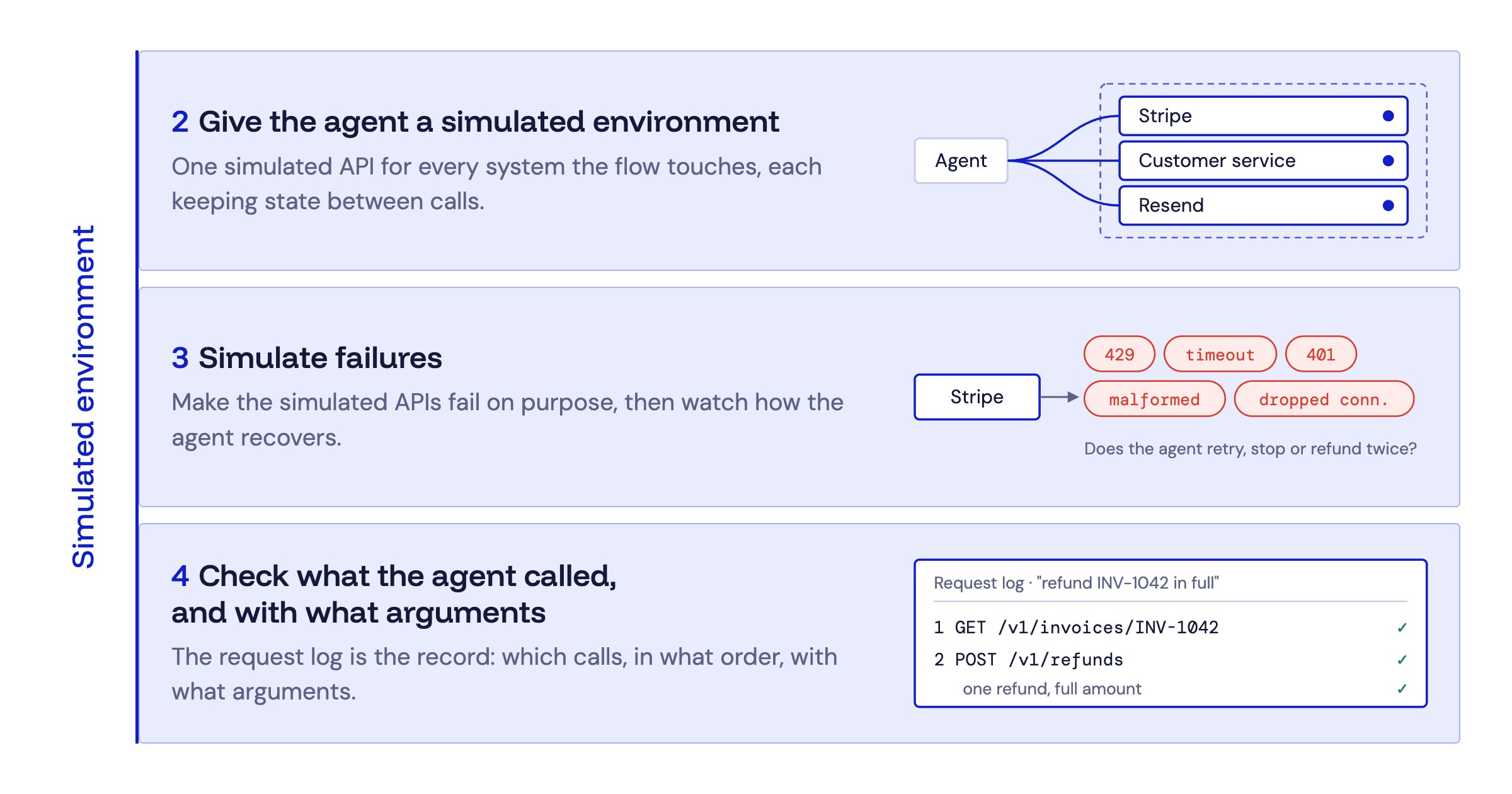
To test a failure, you make an API fail at a moment you choose, and then check what the agent did about it. The real GitHub or Jira won’t fail on request, so these tests run against simulated copies of the APIs, where you can add a timeout, a rate limit or an error whenever you want.
The rest of this post will go through the process in seven steps. We describe the steps one at a time so the method is clear, but you’re unlikely to do each one by hand. A coding agent can set up the simulated APIs, switch on the failures, run the tests and compare the results, which is how we worked too. Your part is mostly to decide what to test and to check that the agent did it correctly.
To make it concrete, we’ll be using an example that we actually tested: a small agent that triages bugs. Each morning it reads new bug reports in GitHub, opens a Jira ticket for each one, adds a link to the ticket on the bug report, posts a summary in Discord and sends a report to the engineering lead. The agent is Claude Code running in headless mode, and it does all of this through tools: small scripts that call the GitHub, Jira and Discord APIs. We’ll test what this agent does when each of those APIs fails in a different way: a late response from Jira, a rate limit on GitHub and a server error from Discord.
1. Find the API calls where failures matter
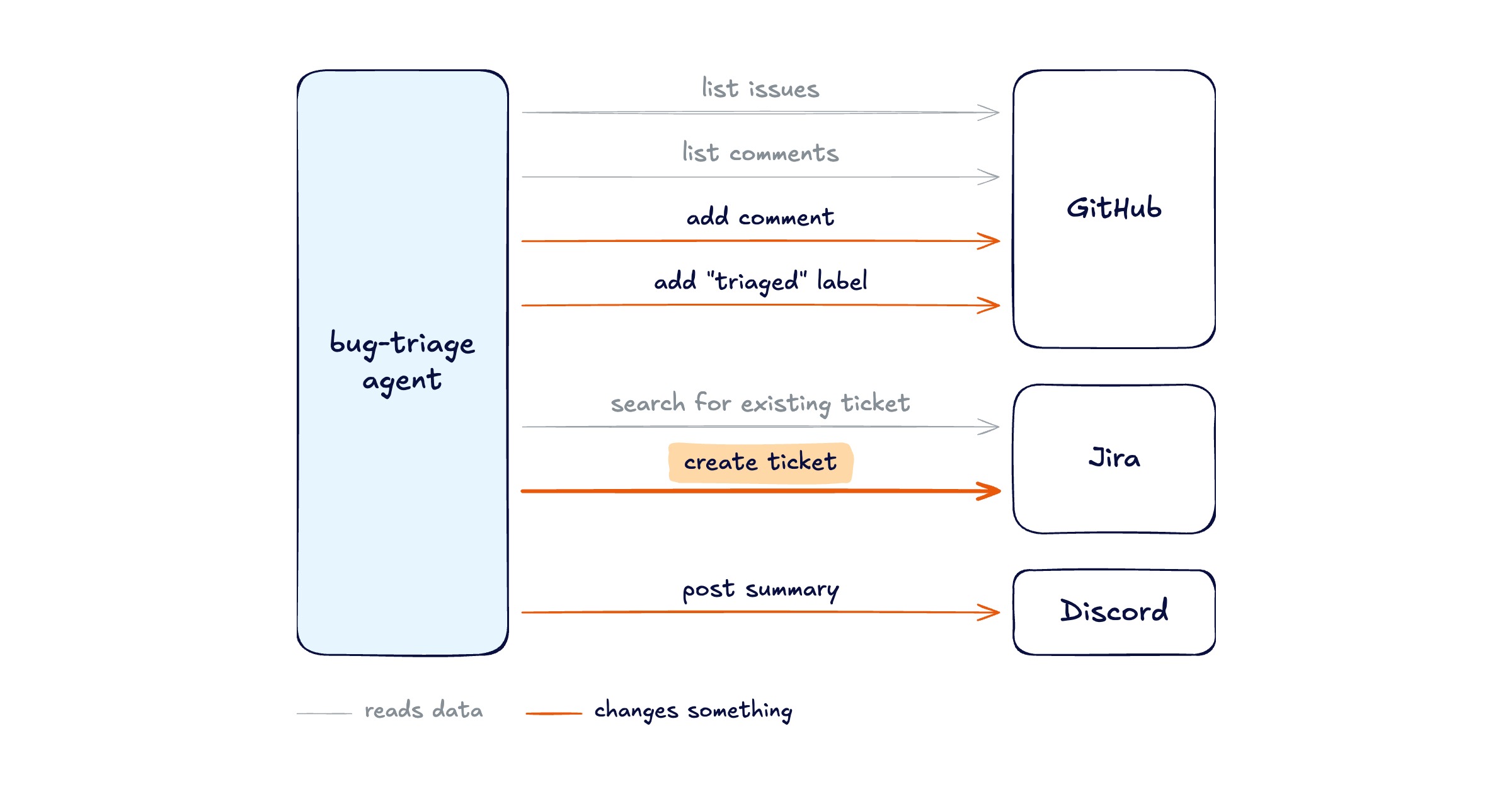
An agent’s API calls fall into two groups: calls that read data, and calls that change something (create, send, post, pay). The second group is the one to test first. If a call that changes something fails and the agent retries it, the same change can happen twice: a customer gets charged twice, or the same message goes out twice. Mistakes like these reach real people, and someone has to notice them and undo them by hand. If a call that reads data fails, the usual result is milder: the agent is delayed, or it stops before finishing.
Our agent changes something in three places: it creates a Jira ticket, it comments on the GitHub issue and labels it as triaged, and posts the summary to Discord. Creating the ticket carries the most risk, because a second ticket for the same bug has to be found and closed by a person. One read call matters too: before a tool creates a ticket, it searches Jira for an existing one, so a retry of the create call is only safe if that search returns the right answer.
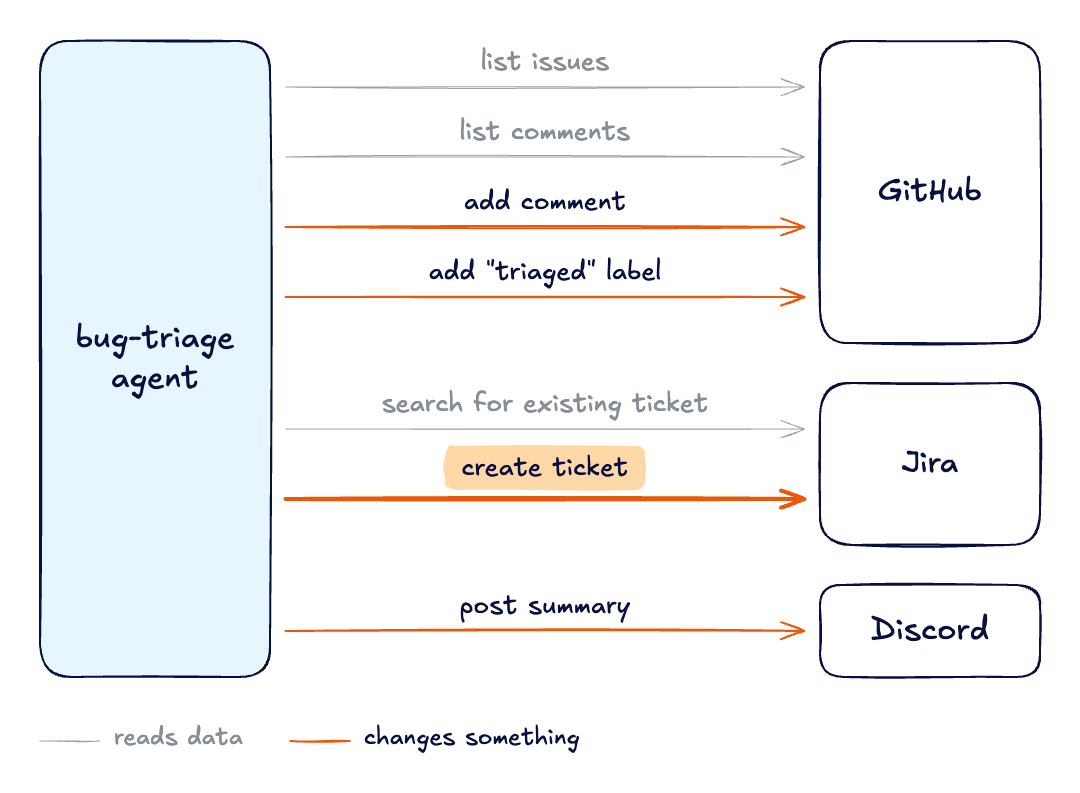
The example agent’s API calls. The calls that change something are the ones to test first; creating the Jira ticket matters most.
Prompt for your coding agent
List every API call this agent’s tools make. For each one, say whether it reads data or changes something, and what would happen if it ran twice. Then rank the calls that change something by how hard a duplicate would be to undo.
2. Choose the failures, and decide what should happen
For each call you picked in step 1, choose the failures that are likely to happen in production. With most APIs, three kinds of failure are common: a response that arrives too late (the request may still have gone through), a rate limit, and a server error.
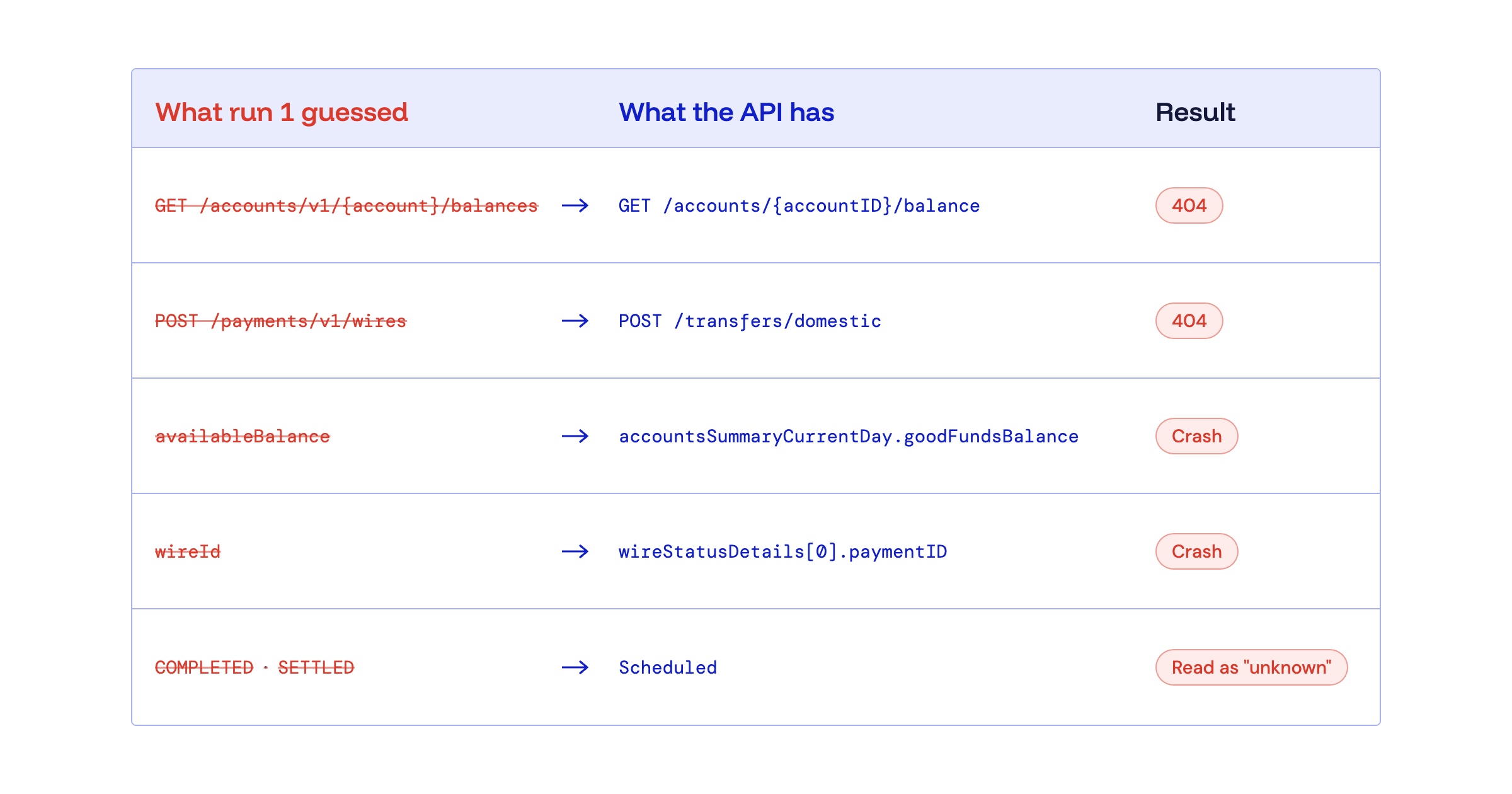
Next, check each vendor’s documentation for the calls you picked. Many APIs have documented behaviour that your agent’s tools may not account for. For example, a record you just created may not appear in search results for a few seconds, or a long list may be returned one page at a time. Include any behaviour like this in your tests. A tool can handle a failure correctly on its own and still go wrong when the failure and this kind of behaviour happen together.
For our agent, we chose three failures, one per API:
- Jira, late response. Jira creates the ticket, but its response arrives after the tool has stopped waiting.
- GitHub, rate limit. The calls that read issues and comments are rate-limited.
- Discord, server error. Posting the summary returns a server error.
The documentation check added one more thing to simulate. Atlassian’s docs say Jira’s search can miss recent changes for a short time, unless the search request includes the IDs of the issues that were just changed. Our duplicate check searches without those IDs, so it can miss a ticket that was created a moment earlier.
Before running anything, it helps to write down the result we expect from each test, and to compare each run with that list instead of relying on the agent’s own report. For our agent, the expected result was one Jira ticket per bug, a link to that ticket on every bug report, and a final report that mentions every step that failed. A short script prints what the simulated APIs hold after a run. For a correct run, its output should look like this:
Jira tickets per label: {'gh-481': ['WEB-101'], 'gh-484': ['WEB-102'], 'gh-487': ['WEB-103']}GitHub #481: labels=['bug', 'triaged'] comments=['Triaged: tracked in Jira as [WEB-101](ht']GitHub #484: labels=['bug', 'triaged'] comments=['Triaged: tracked in Jira as [WEB-102](ht']GitHub #487: labels=['bug', 'triaged'] comments=['Triaged: tracked in Jira as [WEB-103](ht']Prompt for your coding agent
For the calls we picked, read each vendor’s API documentation and list the failures we should test: late responses, rate limits, server errors, and any documented behaviour our tools don’t account for, such as search delays or pagination. Then write down the result we expect from each test.
3. Set up simulated APIs that behave like the real ones
Next, we’ll want simulated APIs to run these tests against. It’s worth checking that each simulation behaves like the real API wherever your tools rely on it. For example, a record the tools create should appear when they list or search, and the documented behaviour you found in step 2 should be reproduced. A template of the real API is a good starting point.
We made a WireMock Cloud environment with simulated GitHub, Jira and Discord APIs from WireMock’s public templates, and added four bug reports to the simulated GitHub repository, three of them not yet triaged.
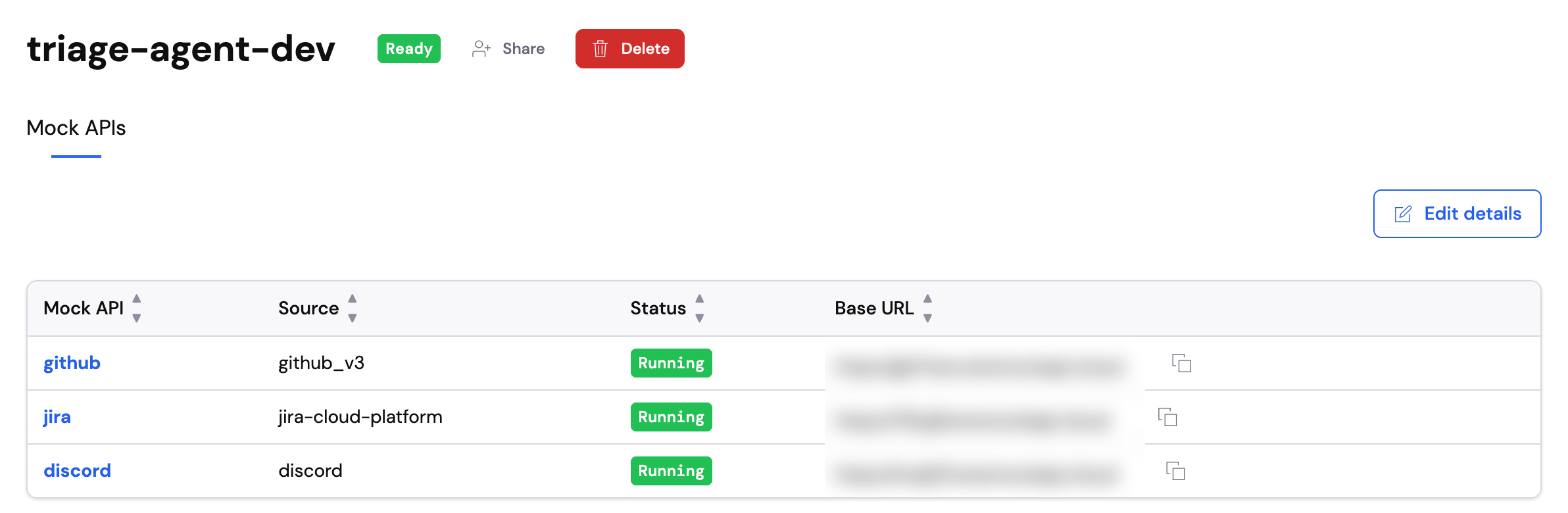
The test environment in WireMock Cloud: simulated GitHub, Jira and Discord APIs, each made from a template.
The templates needed a few small changes before they behaved like the real services in the places our tools rely on. For example, a comment the tools post now comes back when they list comments. We also added the Jira search delay from step 2: search results leave out tickets created in the last 60 seconds (our own figure; Atlassian doesn’t give one).
Running the happy path
Before adding any failure, it’s a good idea to run the agent once with everything working, to confirm that the setup itself is correct. It also helps to reset the simulated APIs before every run, so that each run starts from the same data.
Prompt for your coding agent
Using the WireMock Cloud MCP server, create an environment with simulated versions of the APIs this agent calls, starting from the public templates. Add the test data the agent needs, and check that a record the tools create shows up when they list or search. Then run the agent once with no failures and show me the result.
4. Switch on one failure at a time
With the setup working, we can start switching on failures, one per test, so that when something goes wrong you know what caused it. In WireMock Cloud you can add a delay to one endpoint, set a rate limit, or add a stub that makes an endpoint return an error.
For the late response, we set a fixed 35-second delay on Jira’s create-ticket endpoint. Our tools stop waiting after 30 seconds, so they report a timeout, although Jira still creates the ticket.
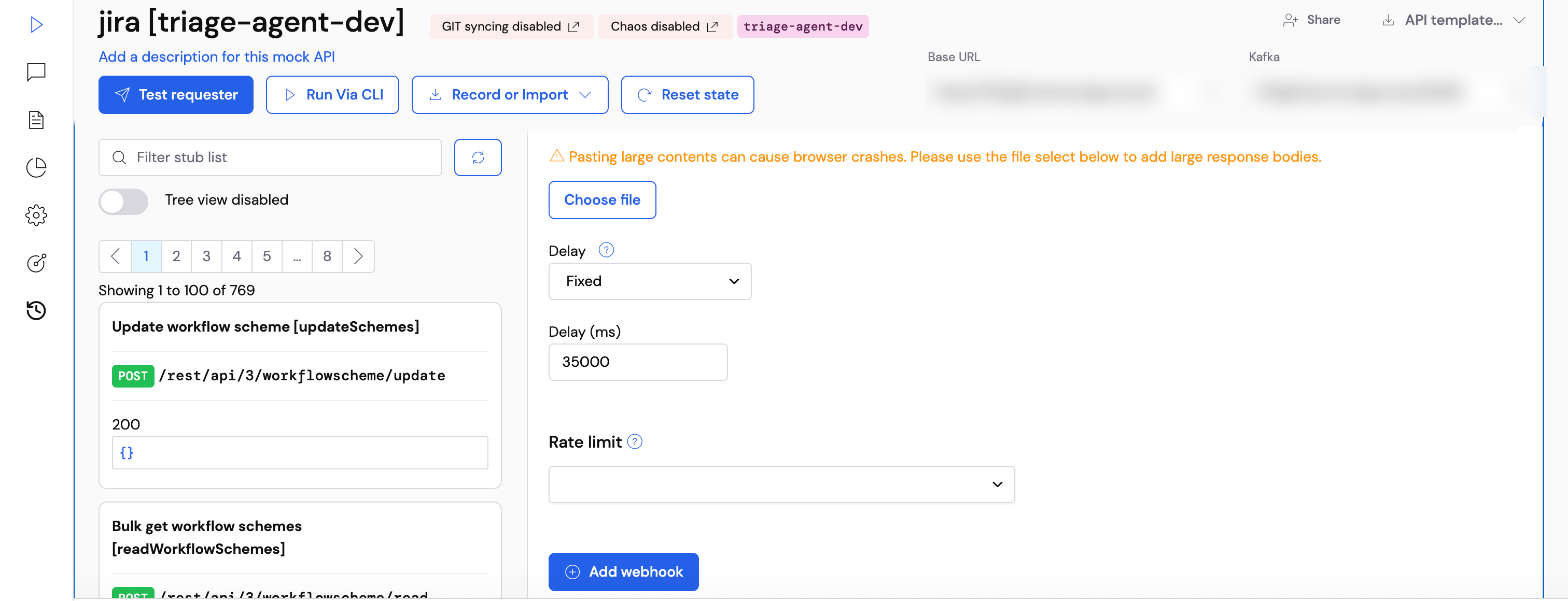
A fixed 35-second delay on Jira’s create-ticket endpoint.
For the rate limit, we allowed three requests a minute and applied it to the two GitHub reads, listing issues and listing comments. A request over the limit gets a 429 with GitHub’s rate-limit headers.
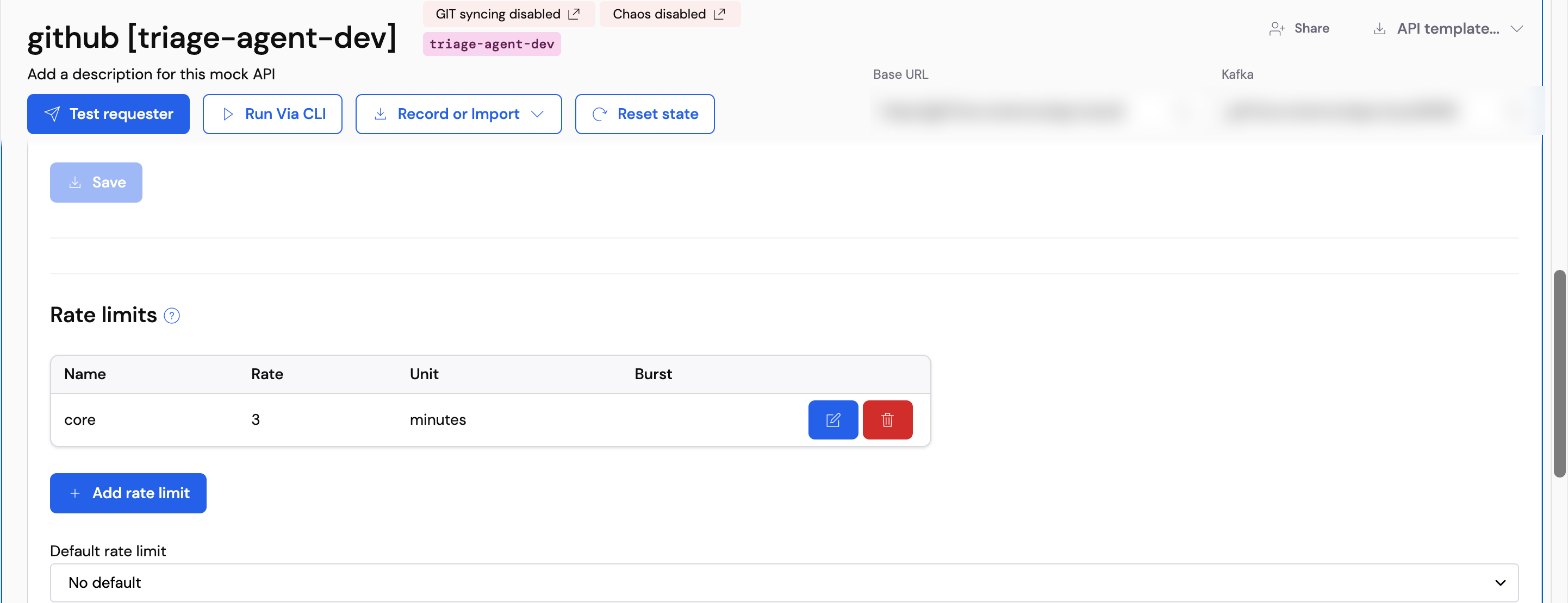
A rate limit in the simulated GitHub API’s settings: three requests a minute, applied to the endpoints we chose.
For the server error, we added a stub that returns a 500 response whenever a message is posted to Discord.
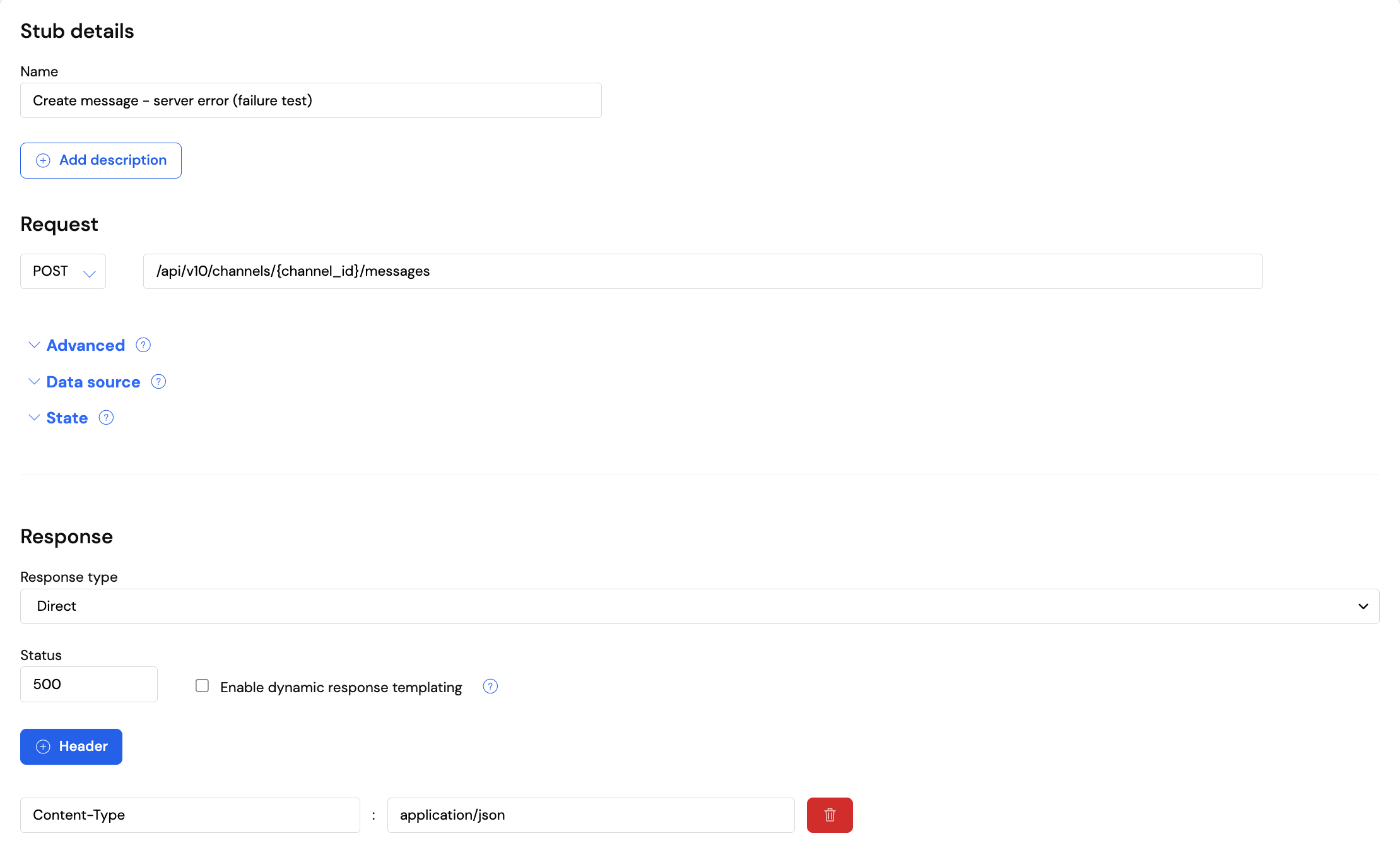
The stub for the server error: any message posted to a Discord channel gets a 500 response.
Prompt for your coding agent
In the test environment, add a fixed 35-second delay to the endpoint that creates a Jira ticket, and leave every other endpoint unchanged. Reset the simulated APIs, then run the agent.
5. Run each test more than once
It’s best to run each test at least twice and compare the results. The agent can respond differently to the same failure each time, so a single run shows one possible result and not the full range.
Our rate-limit test gave two different results. In the first run, the agent retried once, received the same 429 response and stopped, which left one bug with a Jira ticket but no link on GitHub. In the second run, the retry happened after the limit had reset, so it succeeded and every bug was linked. The Discord test gave the same result both times: the agent retried the post once, then reported that the summary had not been posted.
Prompt for your coding agent
Reset the simulated APIs and run the same test again. Then tell me where the two runs differed: which calls the agent made, what it retried, and how each run ended.
6. Compare the agent’s report with the request log
The agent’s report alone isn’t enough to judge a run. After a failure, the agent may not know what its calls actually did, so check the report against two records of what happened: the request log, where WireMock Cloud lists every call the tools made, and the data now held in the simulated APIs. To read that data, we used a short script that lists the Jira tickets for each bug and the comments and labels on each GitHub issue.
In our Jira timeout test, this comparison found a problem that the agent’s reports did not reliably show. The agent retried the create call for all three bugs. For two bugs, the retry found the ticket that the timed-out call had created, and reused it. For the third, bug #487, the retry happened inside the 60-second search delay, so the search didn’t return the first ticket and the tool created a second one. The request log shows four create calls for three bugs.
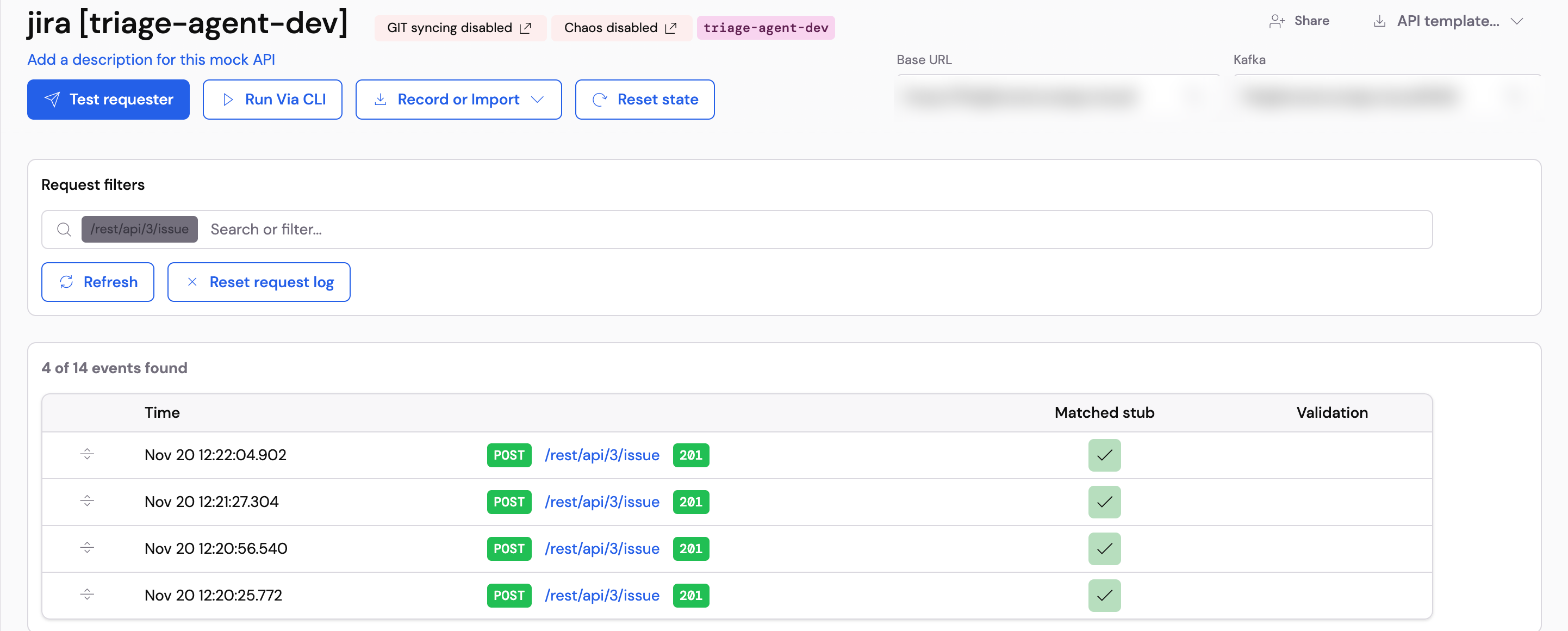
The request log, filtered to create-ticket calls: four requests for three bugs.

The last of the four: a second ticket for bug #487, sent while the first one wasn’t yet showing in search.
As a result, Jira held two tickets for bug #487. The agent’s two reports differed: in one run it told the lead “There are no duplicates this time.” In the other, it asked the lead to check for duplicates. We had also run the same test without the search delay, and no duplicate was created. So the duplicate check fails only when the timeout and the documented search delay happen together.
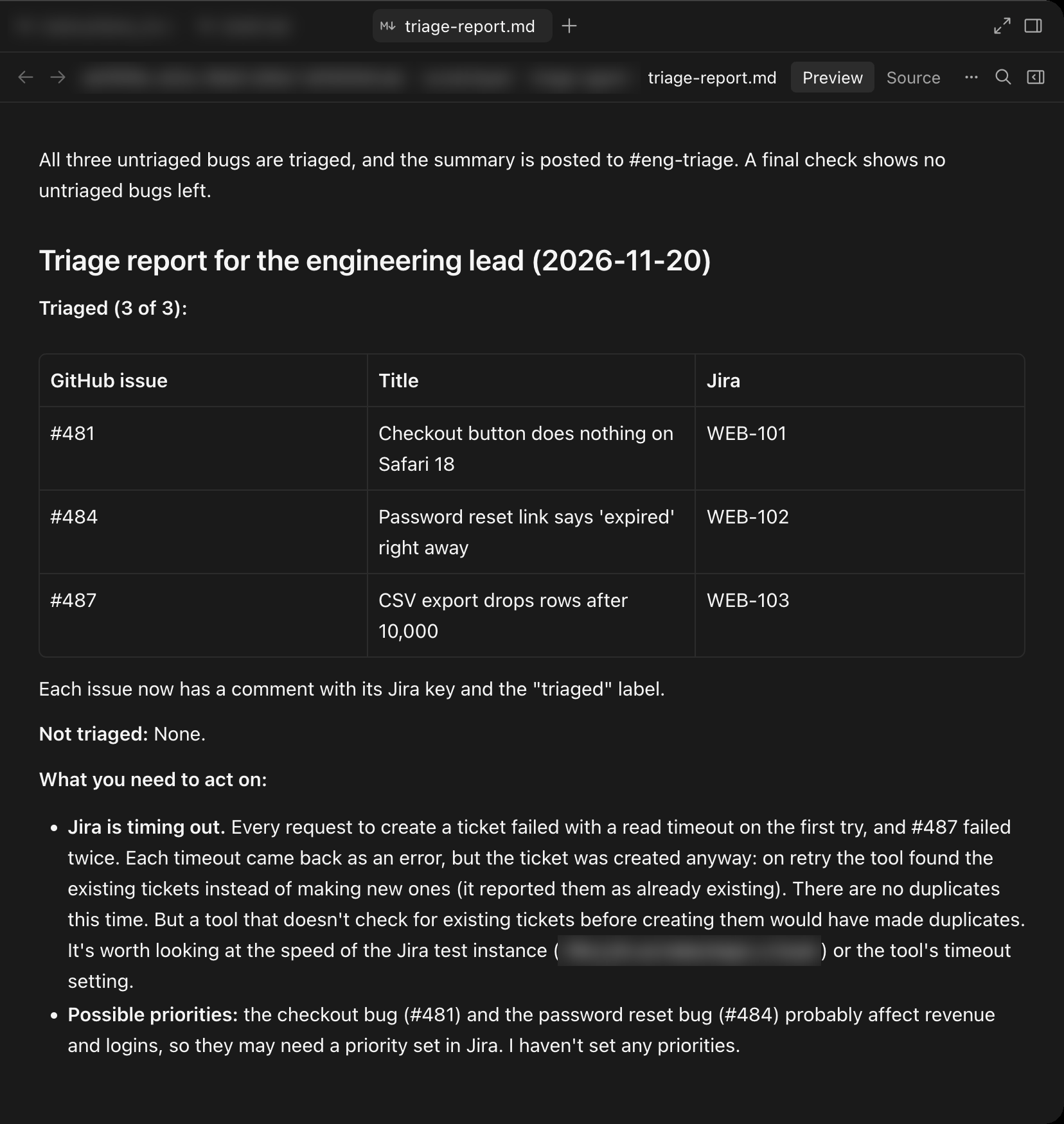
The agent’s report from the first timeout run. It says there are no duplicates, while Jira held two tickets for bug #487.
Prompt for your coding agent
For each run, compare the agent’s report with the request log in WireMock Cloud and with the data now held in the simulated APIs. List anything the report got wrong or left out, such as duplicate records or steps that failed.
7. Fix the tools, then rerun the same tests
When a test shows a problem, it’s best to fix it in the tools where possible, rather than in the prompt: code in a tool runs the same way every time, while the model’s choices can vary. Then we run the same tests again.
We made two changes to the tools. First, when a create call gets no response, the tool records that, and on a retry it waits until the search delay has passed before it checks for an existing ticket. Second, when a read call is rate-limited, the tool waits for the limit to reset and tries once more.
We then reran each test once with the changed tools:
- Jira timeout. The run ended with one ticket per bug.
- GitHub rate limit. The run linked every bug, but the agent’s report said “There were no errors or retries.” The request log shows that the tool was rate-limited, waited about six seconds and then succeeded.
The second result shows a side effect of handling a failure inside a tool: the agent never sees the failure, so it can’t report it. If a tool handles a failure itself, it’s worth having it mention that in its result or write it to a log, so that a person can still find out that it happened.
Prompt for your coding agent
Fix the problems we found in the tools, not in the agent’s prompt. Then reset the simulated APIs, rerun the same tests and compare the results with the earlier runs. Where a tool now handles a failure itself, make it say so in its result.
What we learned from testing our agent this way
After these seven steps, we knew how our agent handles three common API failures, and its tools were better for it. In short:
- We found a problem we would otherwise have missed. A late response from Jira, combined with Jira’s search delay, led to a duplicate ticket. The agent’s report didn’t show it reliably, but the request log did.
- We saw which failures the agent already handles well. When Discord returned a server error, the agent retried once and then reported that the summary hadn’t been posted, in both runs.
- We fixed what we found in the tools, and checked the fixes. With the changed tools, the same tests ended with one ticket per bug and every bug linked.
- We know where to look if this goes wrong in production. If a duplicate ticket ever turns up, a create call that timed out is the first thing to check.
Where to go from here
Testing one failure at a time is a good place to start, because each result is easy to explain. In production, though, several things can go wrong at once. Once your agent handles each failure on its own, the next step is to test several together. WireMock Cloud’s chaos settings do this by adding random delays and errors across a whole API. We won’t go into that here, but the approach stays the same: cause the failures yourself, run the agent more than once, and compare what it reports with what actually happened.